
Include a Routine When Adding New Clients
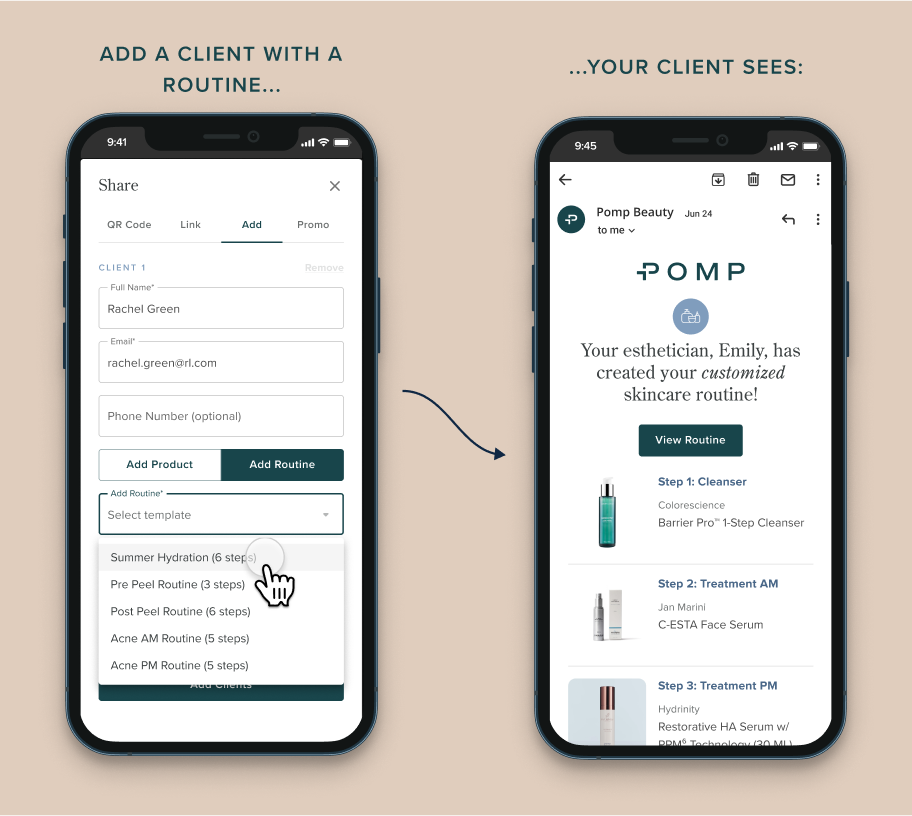
FOR ELEVATED & ELITE ESTHETICIANS ONLYSave time by including a routine template when you’re adding new clients to Pomp!
Why Routines?
Improved Compliance: clients with routines can easily follow the exact steps and products you want them to use for their at-home regimen.
Higher Average Order Value: clients with routines are 4x more likely to purchase product, as well as typically have a 15% higher average order value.
Save Time: no need to make a note to go back to your client’s account and create their new routine; simply select the routine template when adding your client, and you’re done in one step!
How it works:
From your dashboard or quick actions menu, tap “Add Client”
Enter your client’s full name and email, like you normally would
Select “Add Routine” and simply select one of your routine templates
Tap “Add Client” and you’re all set!
Haven’t set up your routine templates yet? Read more about this time-saving feature here!
💡 How are other estheticians like you using routine templates?We’ve seen estheticians curate their favorite products into routines, such as:
Makeup Favorites
Acne Routines
Dry Skin Routines
Body Bundles
Anti-aging Routines
Seasonal Routines
Teen Acne Routines
Sensitive Skin