
Maximize Your Earnings By Adding Products to New Clients
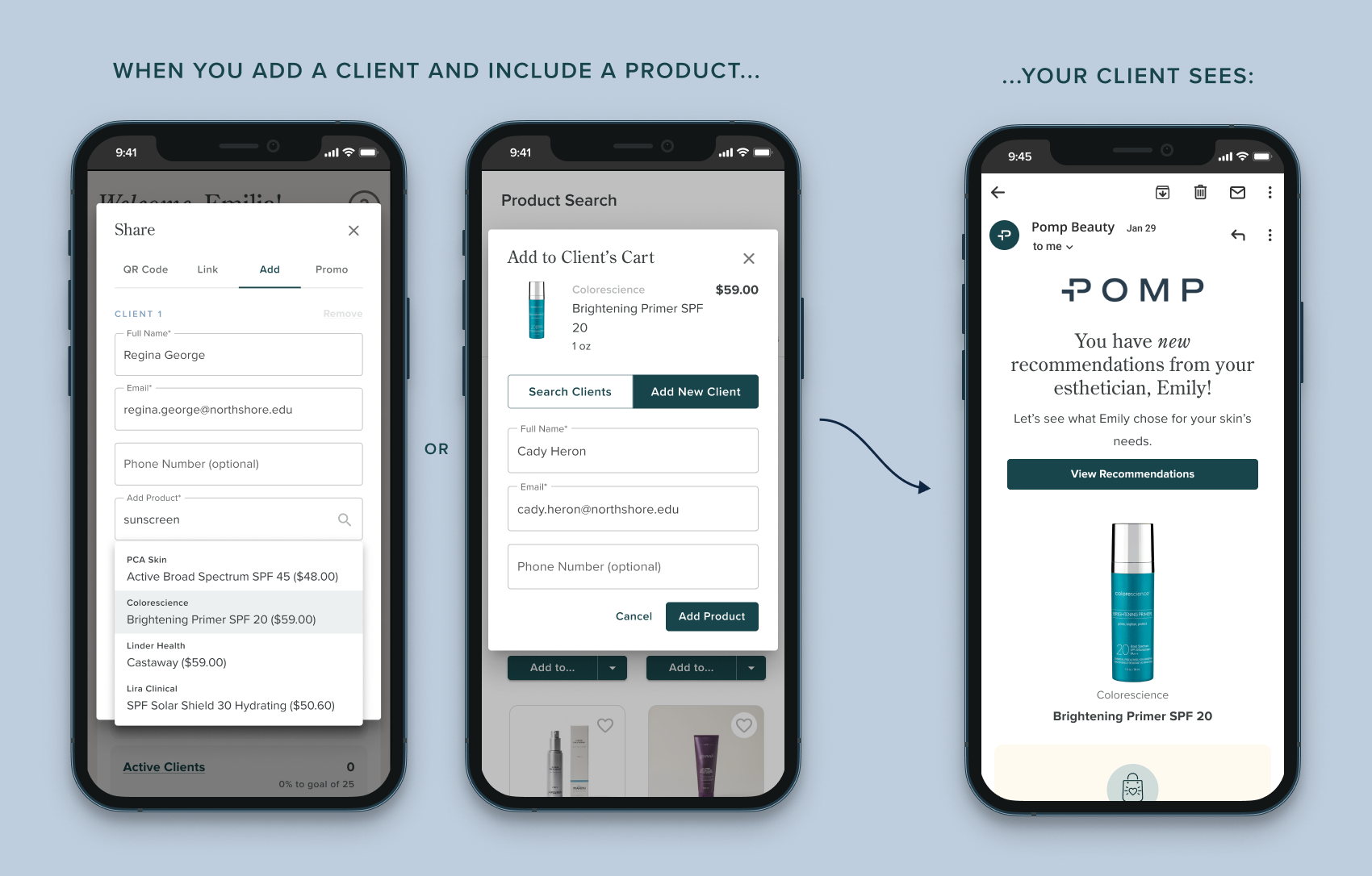
Struggling to get your clients to shop your recommendations through Pomp? Including a product when you add a client increases the likelihood of your client confirming their account and also purchasing!
💡 DID YOU KNOW?Clients added with a product are 44% more likely to purchase products than clients added without a product.
Clients love products
We’ve run the numbers and it’s clear: clients love to shop their esthetician’s recommendations!
🛍️ Clients are most likely to purchase something within 1-2 days of creating their Pomp account, so making sure they have products from you in their cart sets them up for success.
😍 Clients are more likely to create their Pomp account when you add them with products. Seeing your personalized product recommendation makes it clear that shopping through Pomp is how they can support your business!
⏰ Including products when you add clients also saves you time!
How to include a product when adding clients
FROM YOUR DASHBOARDTap “Add Client”
If you’re on your phone, you can find “Add Clients” under your “Quick Action Links” button!
Enter your client’s name and email
Select one or more products, and you’re done!
FROM PRODUCT SEARCHFind the product you want to send to a new client
Tap “Add To…” and select “A Client’s Cart”
Tap “Add New Client”
Enter your client’s name and email, and you’re done!