
Sync your Square appointments with Pomp
What's new
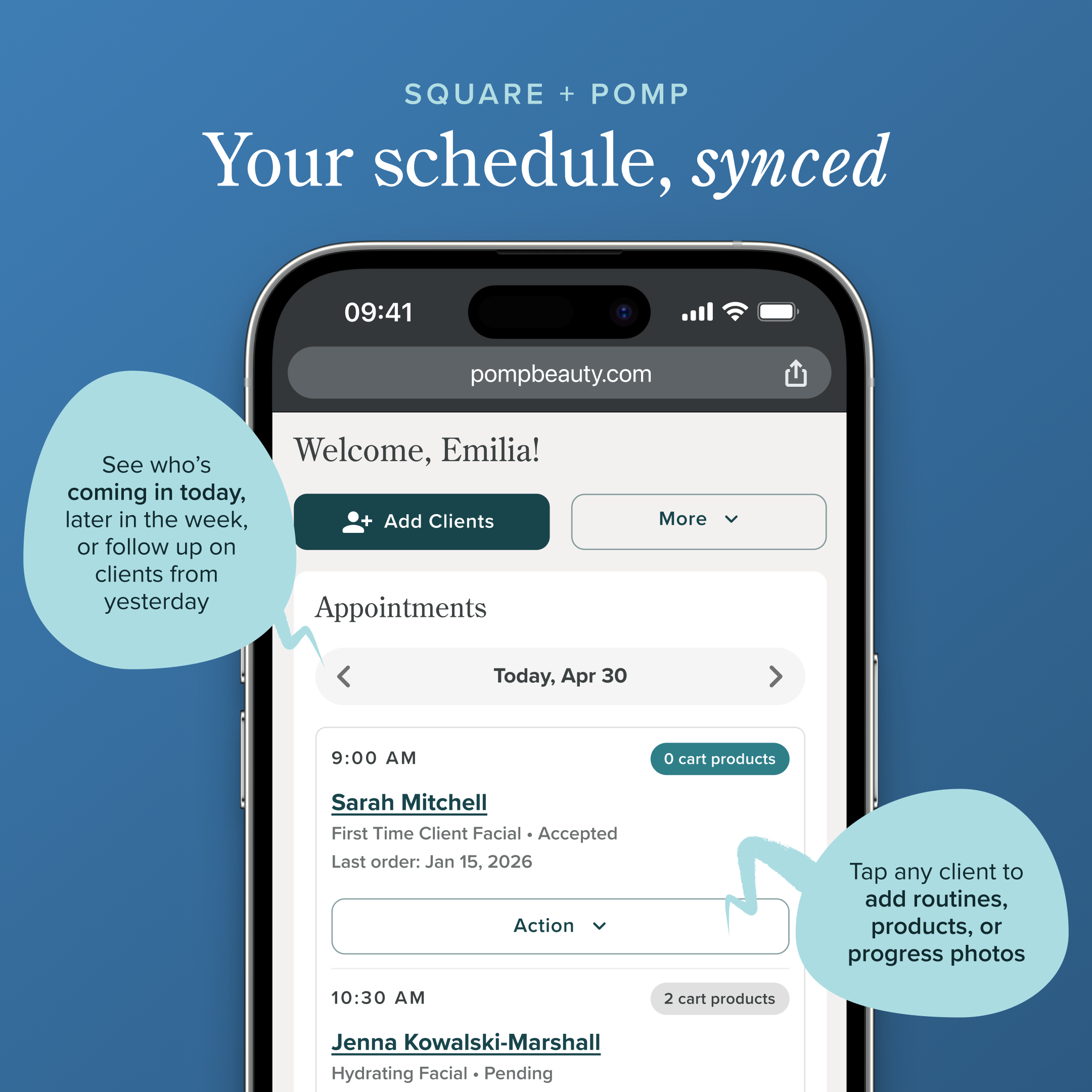
Pomp's Square integration has always let you import your full client list in one tap. Now it goes further: your Square appointments sync directly to your Pomp dashboard, giving you a live view of your schedule without ever leaving Pomp.
Your daily dashboard, upgraded
Every day when you open Pomp, you'll see a list of clients who have have an appointment with you today. You can see their name, their appointment time, what service they’re getting, if they have products in their Pomp cart, and the last time they ordered through Pomp.
You can use the date picker to jump to future dates to plan ahead, or you can tab to previous dates to follow-up on clients you recently saw.
Why it matters
Every client in your treatment room is a retail opportunity — but only if you're prepared. With your appointment list front and center, it's easy to spot who still needs a routine built out, product recommendations added, session notes written, or progress photos uploaded before they arrive.
No more scrambling between apps or realizing after the fact that you missed a chance to recommend something!
How to get started
If you are not yet integrated with Square:
Head to Profile Settings → Integrations in Pomp and tap Connect on the Square integration.
If you are already using our Square integration:
Head to Profile Settings → Integrations in Pomp and tap Reconnect on the yellow banner on the Square integration.
Questions? Email us at estheticians@pompbeauty.com and we can help you get started!
Enable your Square appointment sync today!